
Systèmes d'alerte d'urgence
Intégrez les alertes d'urgence Orisent avec SafetyCulture. Envoyez automatiquement les détails des évacuations et des appels infirmiers de votre système Orisent à SafetyCulture, créant ainsi un enregistrement complet des événements d'urgence pour une meilleure visibilité, un suivi de la réponse et une revue post-incident au sein de vos flux de travail existants.
Fonctionnalités
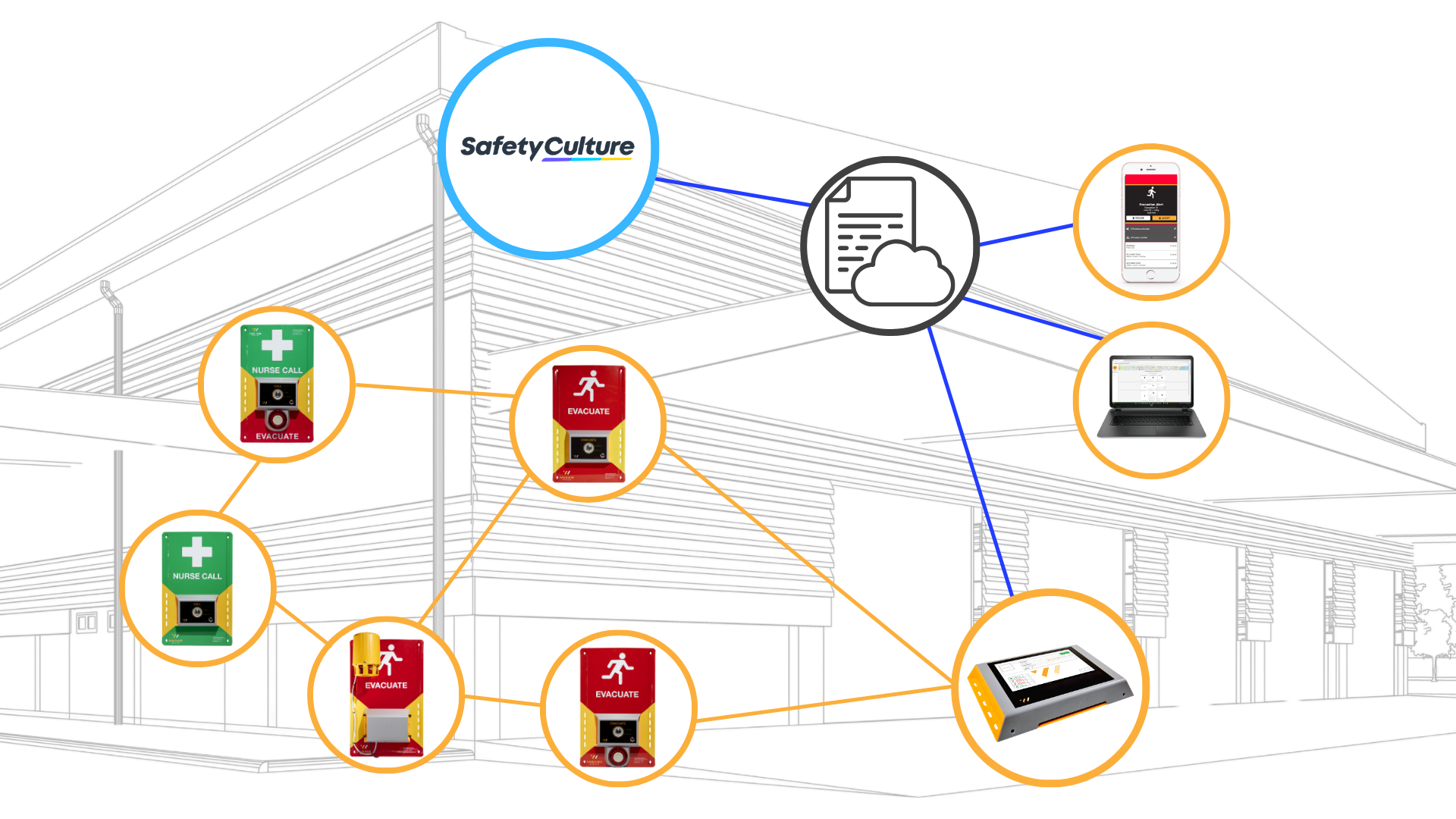
Comment ça marche
- Une alerte d'urgence est déclenchée et gérée par le système d'alerte d'urgence Orisent
- Lorsqu'une alerte d'urgence est déclenchée, un Problème est automatiquement créé dans l'application SafetyCulture
- Chaque Problème inclut l'historique complet de l'événement
- Utilisez le Problème SafetyCulture pour les rapports, les suivis et les examens post-incident
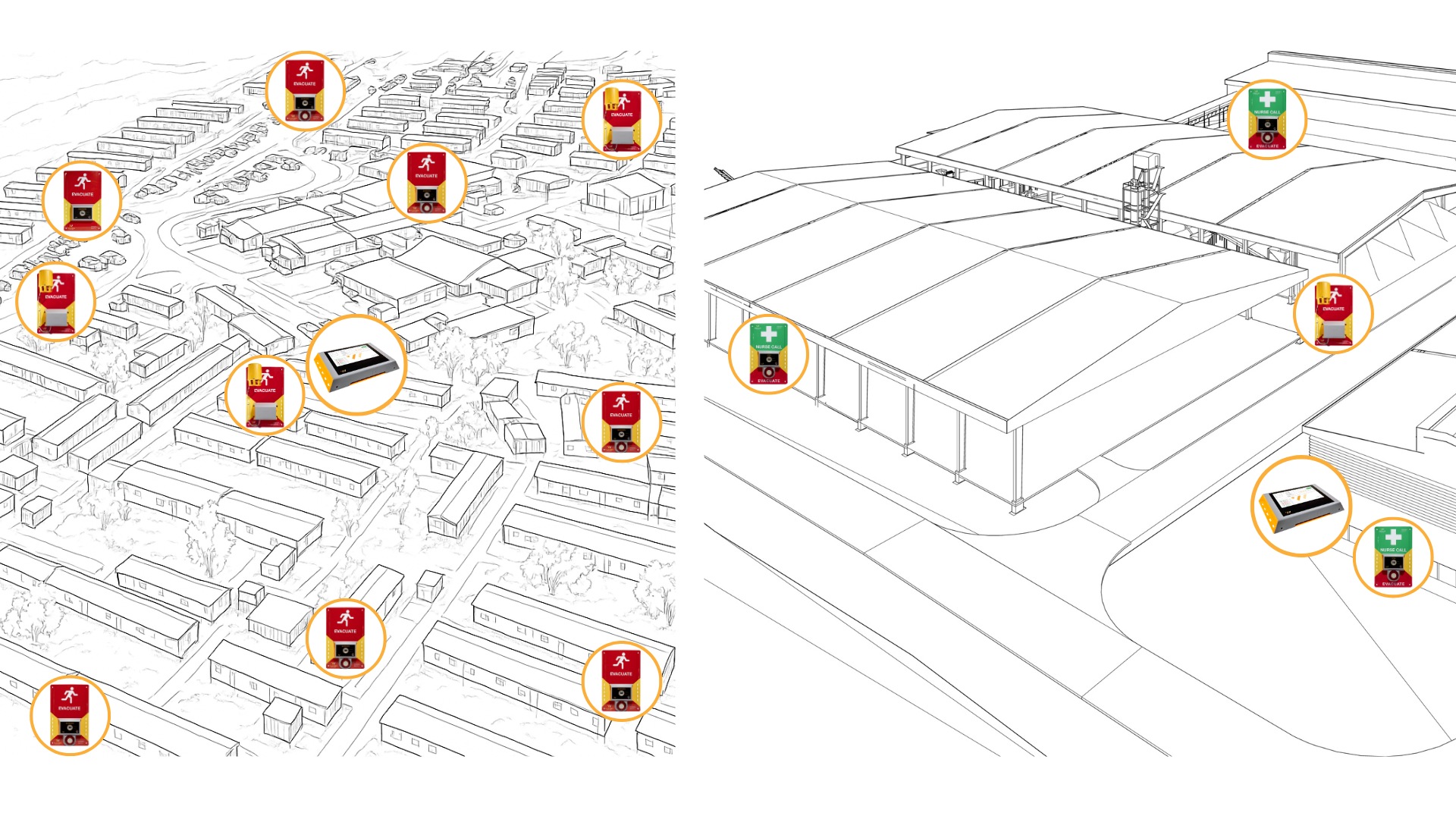
Designed For Your Needs
- Select from evacuation only, nurse call only, and combined functionality
- Evacuation triggers can pair with specific sirens for zoned evacuations
- Optional management approval and escalation
- Various device power delivery options and temporary or permanent setups
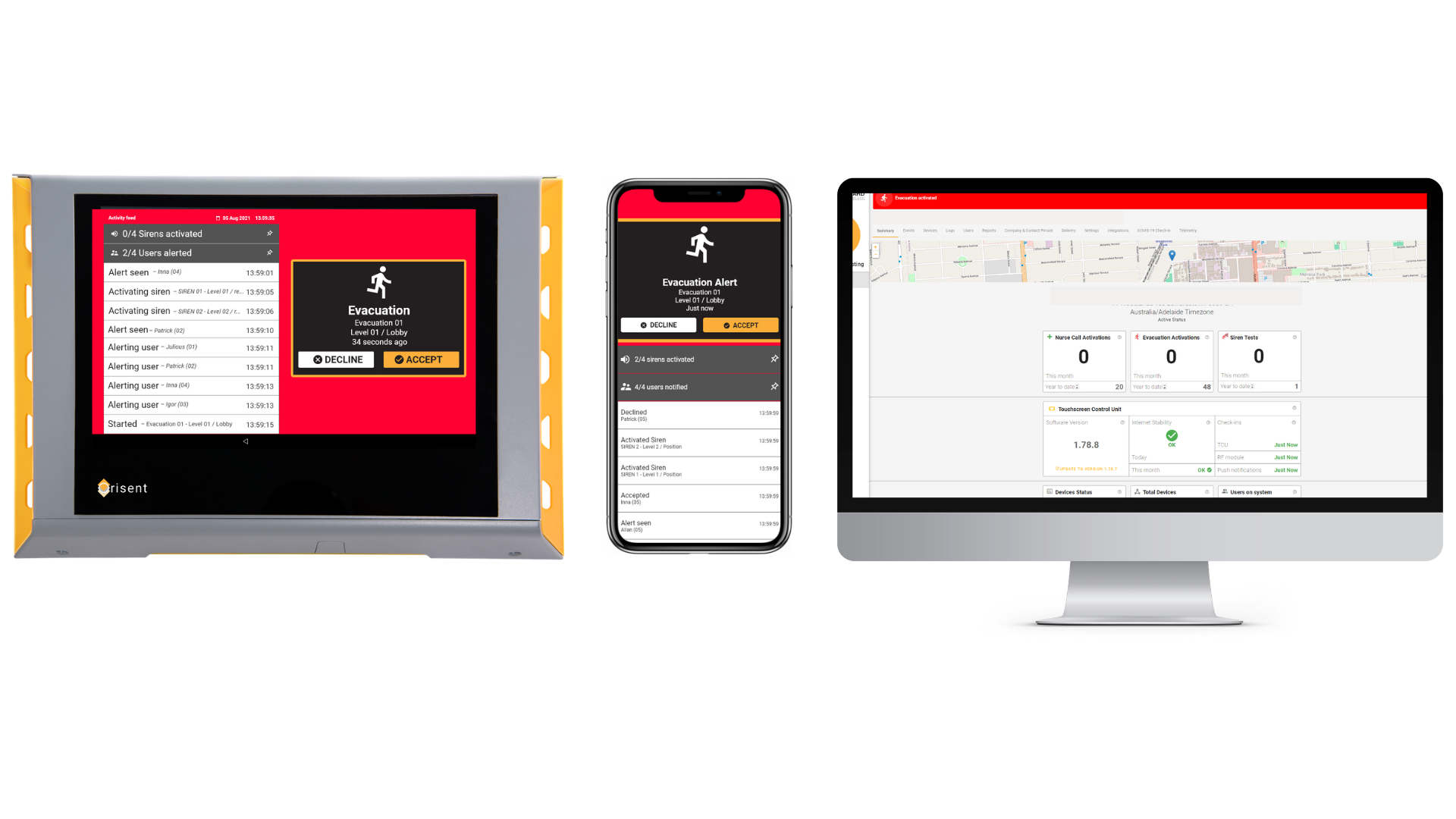
Local & Remote System Management
- On-Site Control: Manage your system and events directly via the on-site Touchscreen Control Unit (TCU)
- Remote Access: Utilise the smartphone app or web-based user portal for remote system management
- Live System Insights: Monitor real-time device power, connectivity, system status, and access detailed telemetry graphs
- User Access: Configure multiple access levels and permission settings to tailor system management across your team
Description
Intégrez de manière transparente votre système d'alerte d'urgence Orisent avec SafetyCulture pour améliorer la visibilité et les examens post-incident.
Grâce à cette intégration, les évacuations et les alertes médicales déclenchées par votre système d'alerte d'urgence Orisent sont instantanément reflétées dans SafetyCulture sous forme de nouveaux problèmes. Cela donne à votre équipe une visibilité en temps réel sur les incidents critiques - le tout dans le cadre de vos flux de travail existants dans SafetyCulture.
Chaque problème inclut l'historique complet de l'événement, comme la date à laquelle une évacuation ou une urgence médicale a été déclenchée, qui a répondu, et quand l'événement a été résolu. Cela permet un examen post-incident approfondi et soutient les processus de conformité et d'audit.
Vous pouvez configurer en option l'intégration pour attribuer automatiquement tous les nouveaux problèmes à un utilisateur désigné de SafetyCulture, soutenant la propriété des tâches et le suivi des bonnes pratiques.
Tous les outils puissants de SafetyCulture - y compris les Inspections, Actions, Analyses et Tableaux de bord - fonctionnent de manière transparente avec les problèmes créés via cette intégration, vous aidant à suivre, rapporter et analyser l'activité d'urgence en toute confiance.
Captures d'écran
Ressources
Notre Équipe

Ed Tancred
Vice President - Sales
As Orisent’s sales leader, Ed Tancred brings two decades of experience in property, construction, and development. He consistently demonstrates the ability to analyse requirements and recommend effective solutions.

Igor Kazagrandi
CEO
Igor Kazagrandi is the CEO and Co-founder of Orisent. He specialises in designing effective strategies that leverage technological innovation and customer insights.
FAQ
We partner with safety-focused businesses to install custom-configured systems at construction sites, civil projects, mines and mining camps, schools, farms, medical centres, aged care homes, factories, wharfs, and abattoirs.
Our solutions are designed to provide a reliable and efficient method to communicate and coordinate emergency responses across sites of any size, with singular and multi-location management capabilities.
Orisent’s systems can be used to trigger and manage a full or partial site evacuation, assist workers to call for help during a medical emergency via a nurse call trigger or wearable, and detect smoke and trigger an alert. They can also be used to lock down a site if you need staff, students, or visitors to remain in place.
Systems are designed specifically for your site and unique business environment.
Orisent’s devices use radio frequency and/or cellular communications networks to connect the devices to one another to form a wireless system. Most of Orisent’s devices also use rechargeable batteries instead of mains power, so installation is easy and straightforward.
Yes. Systems are delivered preconfigured as plug and play with all devices connected to one another. All you need to do is power them up and place them within range of one another.
If you are using a control panel, you can assign each device a location so you know where the trigger was pressed (the location of the emergency). If you are opted into subscription services, you can use the smartphone app to assign device locations and set up individual users, email notifications, and integrations.
If you are using a control panel, you can assign each device a location so you know where the trigger was pressed (the location of the emergency). If you are opted into subscription services, you can use the smartphone app to assign device locations and set up individual users, email notifications, and integrations.
No, you can install an Orisent system without subscription services. However, you must have a subscription if you wish to integrate it with your SafetyCulture account.
Yes, Orisent’s systems are perfectly suited to retrofitting with no hard wiring required. Often you don’t even need specialist installers, as it can be managed in-house with support from our technical team and training resources.
Further questions and answers can be found at Frequently Asked Questions (FAQs)