







Email Inspection Reports Automatically
Automate your inspection report distribution. Send inspections anywhere for record-keeping, compliance and review.
Features
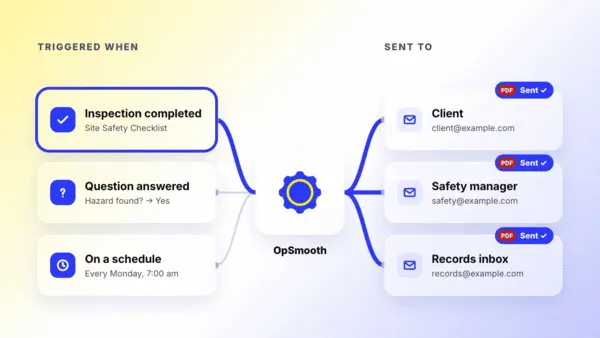
Automatic Report Delivery, Every Time
- Triggered on inspection completion, question answered or on a schedule
- Send multiple emails per inspection
- Zero manual effort required
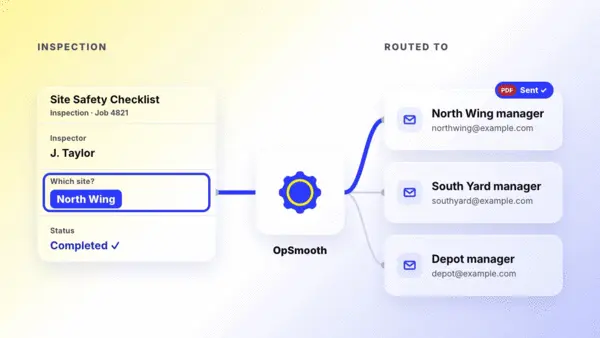
Smart Routing Based on Inspection Data
- Route reports to managers, customers, or dedicated inboxes
- Driven by inspection completion, questions and/or responses
- No manual sorting or forwarding needed
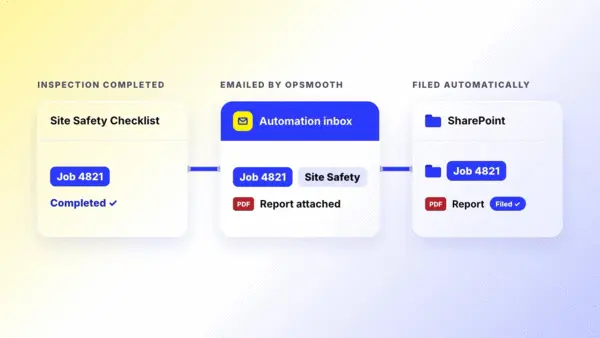
Send reports to a dedicated automation inbox Custom subject lines built from inspection data, so reports file themselves Filed automatically into SharePoint, document libraries or your own workflows
- Send reports to a dedicated automation inbox
- Custom subject lines built from inspection data, so reports file themselves
- Filed automatically into SharePoint, document libraries or your own workflows
Description
Mitti inspection reports, delivered automatically to the people and systems that need them.
Inspections get done, but the admin that follows piles up: downloading reports, forwarding them to clients and managers, and filing them for your records. This integration takes that work off your team. When an inspection is completed, a specific answer is given, or a scheduled time comes around, the report is emailed straight to where it needs to go.
You decide who receives which reports, and when. Route by inspection template, site, results or any question in the form. Send the client their report, alert the safety team when a hazard is found, and keep a copy for your records, all from the same inspection. Reports can also go to a dedicated automation inbox, with subject lines built from inspection data like the job number, so your existing workflows can file them straight into SharePoint or other systems.
Key capabilities
- Routing rules based on inspection template, results, site or custom field values
- Delivery on completion, on specific responses, or on a recurring schedule (daily, weekly, monthly)
- Multiple recipients and multiple emails per inspection, for internal teams, clients, contractors or regulators
- Instant emails when a specific answer is given, such as a failed item or a hazard
- Custom subject lines built from inspection data, such as job number, site or date
- Automation inbox delivery for filing into SharePoint, document libraries or your own workflows
- Custom email content, sent from a custom @opsmooth.com address
- You choose which inspection templates are automated
Built for operations and safety teams who can't afford missed reports or manual forwarding. OpSmooth sets it up around how you already work, then builds and hosts it on AWS. Most setups are live in 1–2 days.
Media
Our Team

Taras Maynoor
Founder
Taras is an Ex-SafetyCulture CS Engineer. With 3+ years of experience delivering technical implementations for SafetyCulture's Enterprise Customers.
Pricing
* The pricing here is for display purposes only. You should contact the partner for the most up to date and correct pricing information. We do not take any responsibility for this pricing information, which is provided by our partners. Pricing last updated: 16 Nov, 2026 12:00AM
FAQ
The workflow is built and hosted on AWS.
This workflow can be set up in 1-2 days depending on the complexity of the request.
Emails will be sent from the OpSmooth Domain. So they will be sent from and email like:
[Custom]@opsmooth.com where the [Custom] text can be modified for your needs.